
Download Falcon.io – Social Media Management, Customer Engagement & Marketing Tool
Overview: Turning Raw Data into Real Customer Relationships
Falcon.io is a cloud‑based social media management platform that combines listening, publishing, engagement, and analytics into a single, intuitive dashboard. For business owners who struggle to see beyond a sea of numbers, Falcon.io offers a clear, visual way to transform raw data into actionable insights about real people. The platform’s core promise is to let you listen to audiences, engage with customers, and boost your marketing potential without juggling multiple tools. By centralising every social channel—from Facebook and Instagram to LinkedIn and TikTok—Falcon.io saves time, reduces error, and builds a more coherent brand voice.
Beyond basic scheduling, the software provides advanced audience segmentation, sentiment analysis, and a unified inbox that aggregates comments, messages, and reviews across platforms. This enables marketers to respond in real time, personalize replies, and nurture relationships that feel genuine rather than automated. The built‑in reporting engine delivers visual dashboards that translate performance metrics into clear narratives, helping teams justify spend and optimise future campaigns.
Security is a top priority; all data is encrypted in transit and at rest, and the platform complies with GDPR, CCPA, and other major privacy regulations. Regular updates ensure that new social channel APIs are supported quickly, keeping your strategy future‑proof. Whether you’re a small boutique looking for a free trial or a multinational corporation needing enterprise‑grade scalability, Falcon.io positions itself as the all‑in‑one solution for modern digital marketing teams.
Key Features that Power Customer Engagement
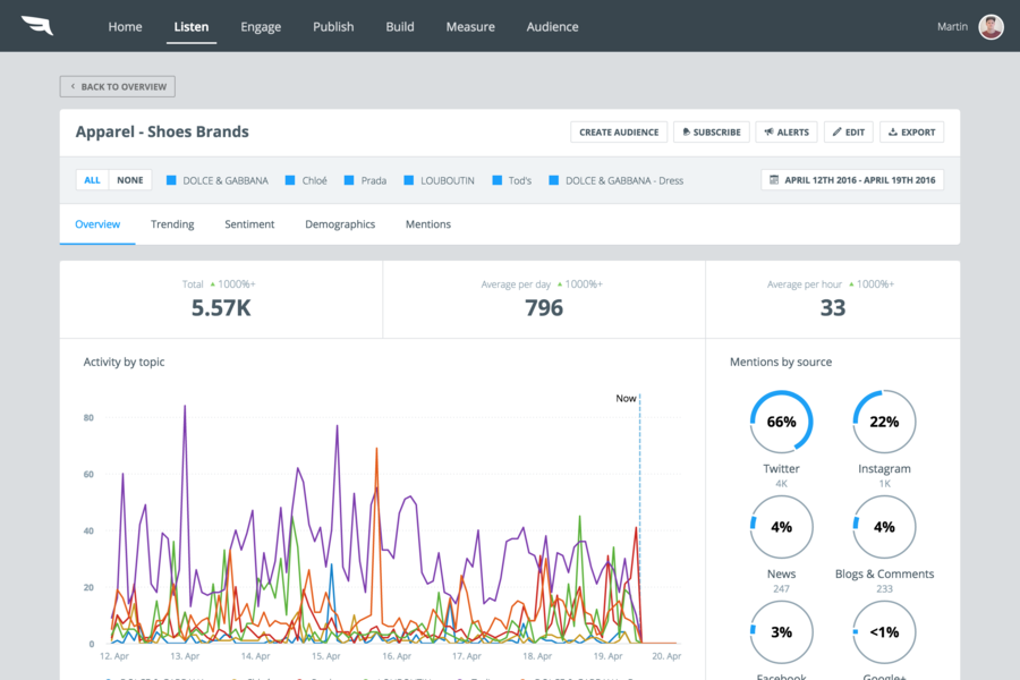
- Social Listening & Listening Streams: Real‑time monitoring of brand mentions, keywords, and hashtags across 30+ platforms, with sentiment scoring and trend detection.
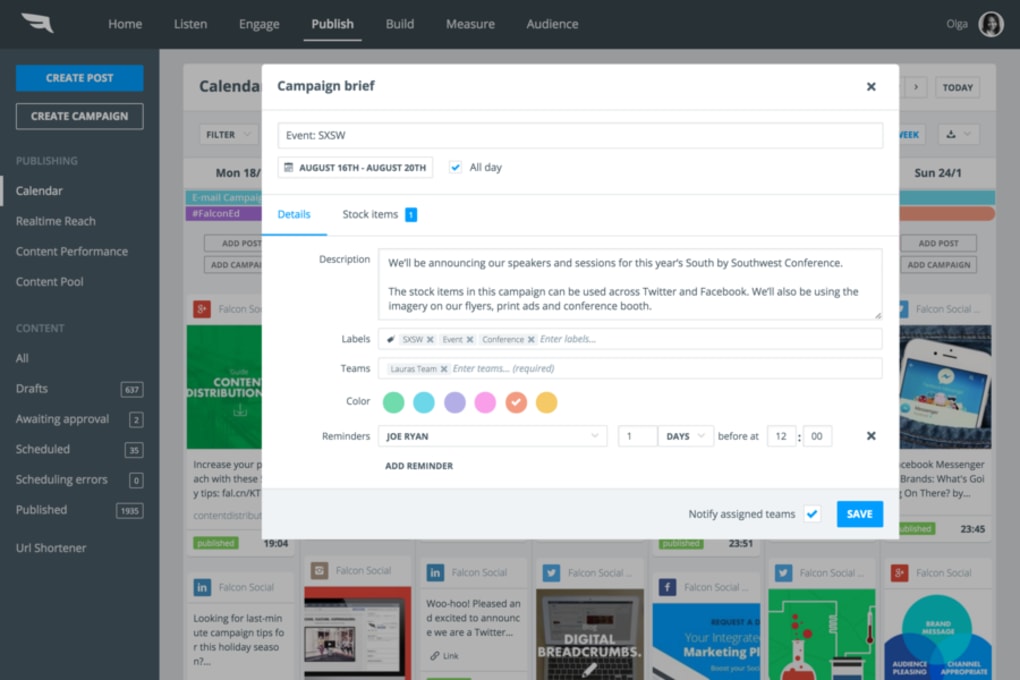
- Unified Publishing Calendar: Drag‑and‑drop scheduler for posts, stories, and ads; supports bulk upload via CSV and AI‑suggested optimal posting times.
- Smart Inbox: Centralised view of comments, direct messages, and reviews; enables team assignment, canned responses, and SLA tracking.
- Audience Segmentation: Build dynamic segments based on demographics, behaviour, and engagement history to target specific groups with personalised content.
- Creative Studio: Built‑in design tools, template library, and brand kit manager to keep visual identity consistent across channels.
- Performance Analytics: Customisable dashboards, exportable reports, and attribution modelling that links social activity to website traffic and conversions.
- Collaboration Hub: Role‑based permissions, approval workflows, and internal chat to keep marketing, support, and product teams aligned.
- Integrations & APIs: Native connections to CRM systems (HubSpot, Salesforce), e‑commerce platforms (Shopify, Magento), and third‑party analytics tools (Google Data Studio, Power BI).
- Security & Compliance: Two‑factor authentication, SSO, data residency options, and compliance certifications for GDPR, CCPA, ISO 27001.
- Continuous Updates: Monthly feature releases, beta programs, and a public roadmap that lets users influence future development.
Each feature is designed to reduce the friction that typically separates data collection from meaningful action. For instance, the listening streams feed directly into the smart inbox, allowing teams to turn a negative comment into a service recovery moment within seconds. Meanwhile, audience segmentation works hand‑in‑hand with the publishing calendar, so you can schedule hyper‑targeted posts that speak directly to each segment’s interests. The result is a more engaged community, higher conversion rates, and a clearer ROI on social spend.
Installation & Usage: Getting Started Quickly and Securely
Step‑by‑Step Setup
- Visit the official Falcon.io website and click the Start Free Trial button. No credit‑card is required for the initial 14‑day period.
- Create an account using your business email. A verification link is sent to confirm ownership.
- Complete the onboarding wizard: select the social accounts you wish to connect, define your primary time zone, and set up basic brand guidelines.
- Enable two‑factor authentication (2FA) from the security settings to protect your dashboard from unauthorized access.
- Import existing content calendars or CSV files to populate the publishing calendar instantly.
- Configure the Smart Inbox by assigning team members to specific channels and setting response SLA targets.
- Run a quick listening test: enter a few brand‑related keywords and let the platform gather mentions for the next 24 hours.
Because Falcon.io is a SaaS solution, there is no traditional installation on a local machine. The entire application runs in the cloud, meaning you can access it from any modern browser on Windows, macOS, Linux, or mobile devices. For teams that prefer a dedicated desktop experience, Falcon.io offers progressive web app (PWA) capabilities that allow you to “install” the web app on Windows or macOS with a single click.
Daily Workflow Tips
Once the initial setup is complete, a typical day looks like this: start by reviewing the listening dashboard for any emerging trends or crises, then move to the Smart Inbox to address pending messages. Use the publishing calendar to schedule content for the next 24‑48 hours, pulling from the Creative Studio’s ready‑made templates. Finally, check the analytics widgets before signing off to ensure key KPIs—reach, engagement, and conversion—are on track. For power users, the API can be called via curl or Postman to automate report extraction or bulk content uploads, extending the platform’s flexibility.
The platform’s UI is built with accessibility in mind, featuring keyboard navigation, screen‑reader labels, and high‑contrast mode. Training resources include a knowledge base, live webinars, and a community forum where users share best practices. Overall, Falcon.io’s onboarding is streamlined enough for small teams yet robust enough for enterprise‑level governance.
Compatibility, Pros & Cons, and Expert Review
Falcon.io runs entirely in the browser, making it compatible with any operating system that supports modern web standards. Officially supported browsers include Google Chrome (latest two versions), Mozilla Firefox, Microsoft Edge, and Safari. Mobile apps are available for iOS 14+ and Android 8+, delivering the same Smart Inbox and publishing features on the go. Because the platform stores data in the cloud, you benefit from automatic backups, zero‑maintenance updates, and real‑time sync across devices.
Pros
- All‑in‑one solution eliminates the need for multiple disparate tools.
- Powerful social listening that feeds directly into engagement workflows.
- Highly visual analytics that translate data into actionable insights.
- Robust role‑based permissions and compliance certifications.
- Extensive integrations with CRM, e‑commerce, and BI platforms.
Cons
- Pricing can be steep for small businesses once the free trial ends.
- Learning curve for advanced segmentation and API usage.
- Some users report occasional latency during high‑volume listening spikes.
Falcon.io delivers a compelling blend of listening, publishing, and analytics that truly helps businesses move from data to dialogue. While the price point may be a barrier for startups, the depth of features, security posture, and seamless integrations make it a worthy investment for mid‑size and enterprise brands seeking a unified social media command centre.
Frequently Asked Questions
Is there a free version of Falcon.io?
Falcon.io offers a 14‑day free trial with full access to all features. After the trial, you must choose a paid plan; there is no permanently free tier.
Can I integrate Falcon.io with my existing CRM?
Yes. Native integrations are available for HubSpot, Salesforce, Zoho, and other leading CRMs. You can also use the open API to build custom connections.
What social platforms are supported?
Falcon.io supports over 30 platforms, including Facebook, Instagram, Twitter, LinkedIn, TikTok, YouTube, Pinterest, and emerging channels like Snapchat and Reddit.
How secure is my data on Falcon.io?
Data is encrypted both in transit (TLS 1.2) and at rest (AES‑256). The service complies with GDPR, CCPA, ISO 27001, and offers SSO, 2FA, and data residency options.
Can I schedule posts for multiple time zones?
Absolutely. The publishing calendar lets you set a default time zone per account and schedule content in local times, ensuring optimal reach for global audiences.
Conclusion & Call to Action
Falcon.io stands out as a comprehensive, secure, and data‑driven platform that bridges the gap between raw social metrics and meaningful customer conversations. Its blend of listening, engagement, and analytics equips businesses of all sizes with the tools needed to nurture loyal audiences, improve campaign ROI, and stay ahead of industry trends. If you’re ready to replace a patchwork of social tools with a single, powerful hub, start your free trial today and experience how Falcon.io can transform raw data into real relationships.
Download Falcon.io now and unlock the full potential of your social media strategy.



.png)



